
How to Send Neutral Letters to Generate More Land Deals
Neutral letters are one of the fastest ways to generate inbound seller calls without locking yourself into a price upfront. Because the letter does not include a specific offer amount, more property owners reach out to ask what you’re offering, which creates higher call volume and more real conversations with motivated sellers.
Neutral letters are also ideal for A/B testing, since you can easily try different tones, phrases, or calls to action by sending small batches and quickly see what performs best.
In the walkthrough below, you’ll learn how to build a quality, filtered list in Map Search and then launch a complete neutral letter campaign using Land Portal’s Mailing Center.
Step by step walkthrough
- Log in to Land Portal
- Open Map Search and choose your target county
From your dashboard, go to Map Search.
Select the county and state you want to target.

- Apply filters to generate a quality mailing list
Neutral letters work best when your list is built from strong criteria.
Use Map Search filters to narrow down your ideal prospects, such as:
- Acreage
- Buildability
- Road frontage
- Wetlands
- Any other criteria you use to qualify land deals

Once your filters are applied, review the results count and list quality. These filtered results will become your mailing list.
- Start mailing directly from the list view
Once your results appear in List View, review the list to confirm it looks accurate, then click Start Mailing.
When you click Start Mailing, Land Portal automatically saves your filtered results as a Saved List and opens the Mailing Center.

- Select the “I’d Like to Buy Your Land” template
Select Real Handwritten Cards + Envelope as your mailing type, then choose the I’d Like to Buy Your Land template and click Next.
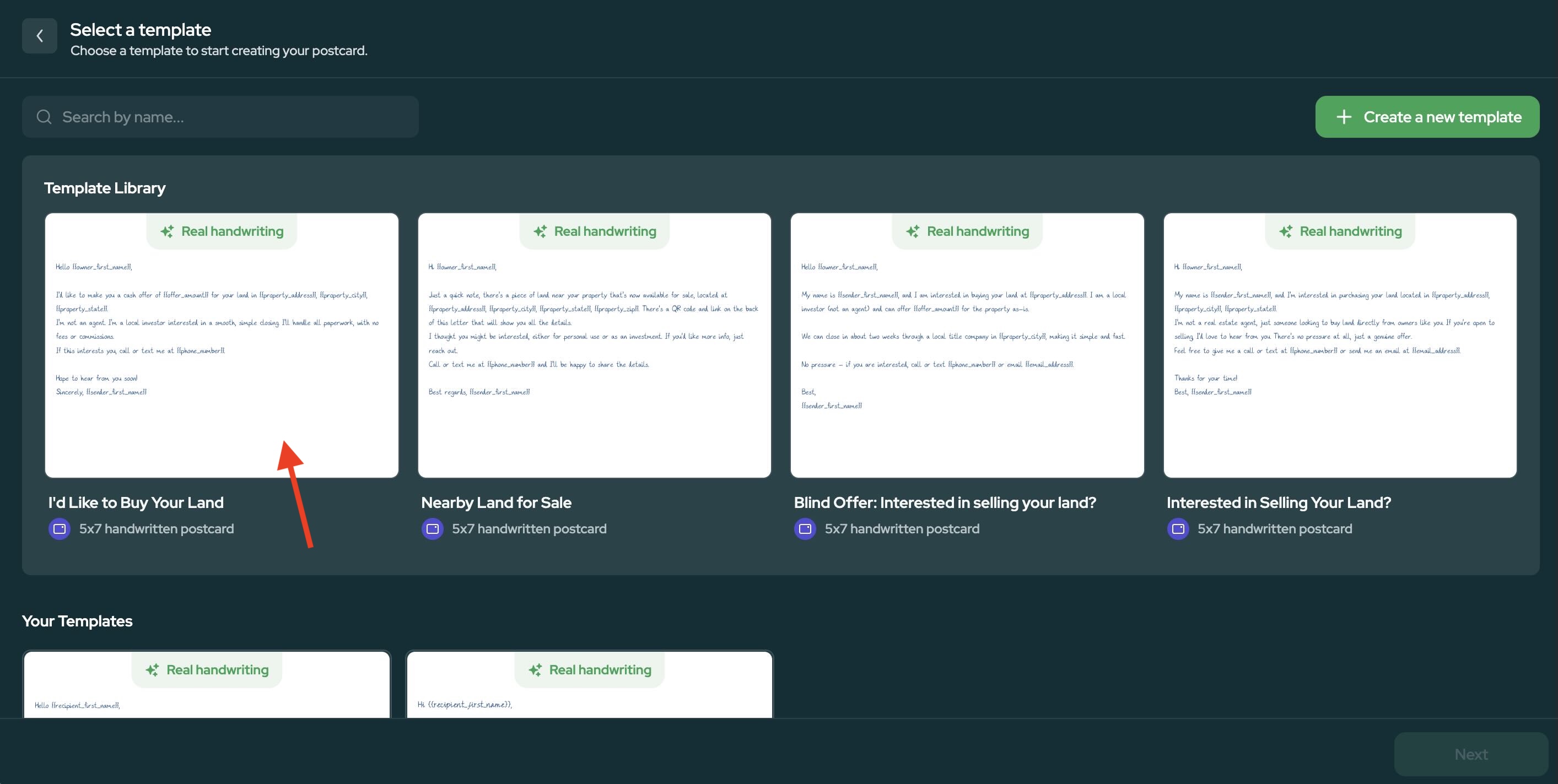
Prefer printed letters? Land Portal also offers a Neutral Letter (1 Page) printed letter template. See How to Send Direct Mail Using the Land Portal Mail Center to compare your options.
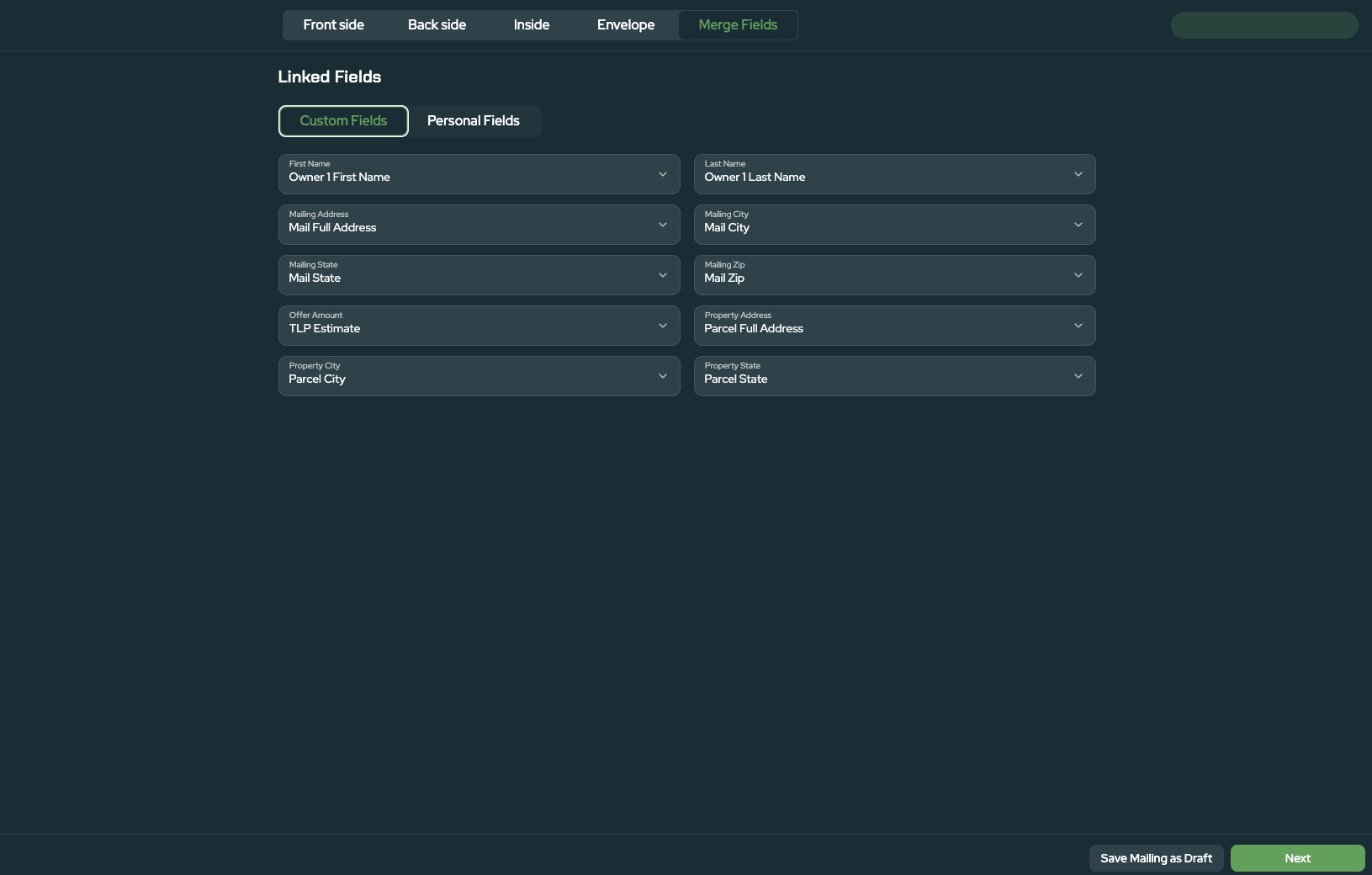
- Review Your Recipients and Field Connections
After you choose your template, review your recipient list. This is where you can remove duplicate records and check addresses before you move on to designing your letter.
Land Portal automatically connects your list data to the matching mailing fields, such as owner name, mailing address and property information. To review these connections, open the Merge Fields tab in the editor and look under Linked Fields → Custom Fields.
- Customize the inside message (neutral wording)
Now it’s time to customize the contents of the letter.
- Open the Inside section of the letter using the tabs at the top.
- Replace the message with your neutral wording.
- Make sure Custom Fields (like first name, property address and county) are included where needed.
Tip: Set up your Personal Fields once, and your name, phone number, email, website and return address will fill in automatically on every mailing.
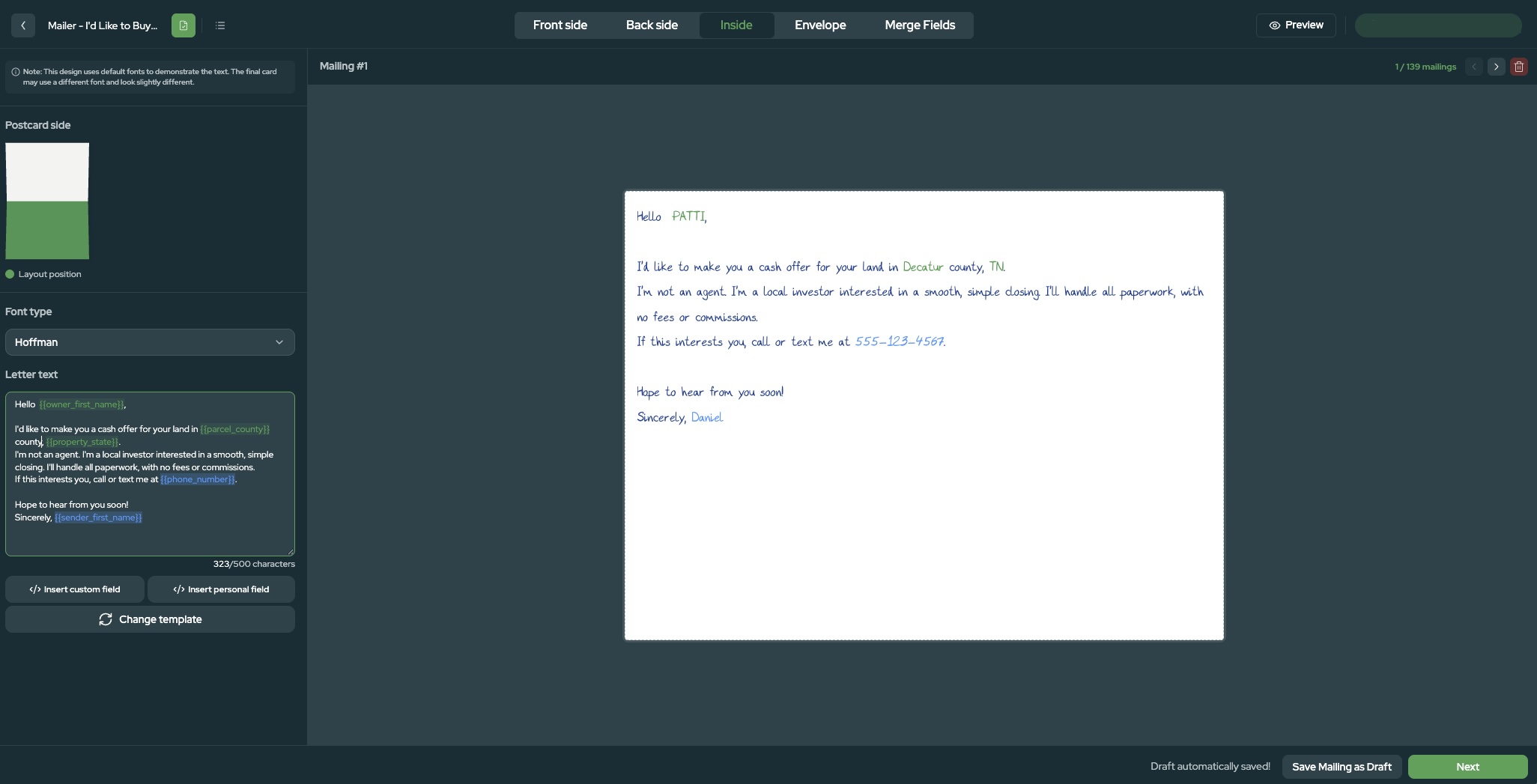
Use the script below as a starting point (edit location details and phone number as needed):
"Hello {{owner_first_name}},
I’d like to make you a cash offer for your land in Chandler Ln, Bath Springs, TN. I’m not an agent. I’m a local investor interested in a smooth, simple closing. I’ll handle all paperwork with no fees or commissions. I can typically offer more than other investors.
If this interests you, call or text me at 222-233-2333.
Hope to hear from you soon!
Sincerely,
Daniel"
- Optional: Create variations for A/B testing
Neutral letters are ideal for A/B testing because they generate high response volume.
To test and improve performance:
- Clone your template.
- Change one element: the tone, first line, call to action or closing.
- Send small groups and compare results.
- Finish Your Design and Send Your Campaign
Before sending, finish the rest of your letter:
- Back: Add an optional QR code that links to your website or a landing page.
- Front: Add an image or your logo, plus your contact information.
- Envelope: Confirm your sender details and choose your mail class.
- Preview: Click through several recipients to confirm names and addresses fill in correctly.
When everything looks right, save your mailing as a draft, schedule it for a later date, or send it now. Before you confirm your order, Land Portal shows an estimated campaign cost so you can review your mailing expenses first.
For a detailed walkthrough of each part of the editor, see How to Create a Handwritten Mail Campaign in Land Portal.
Why Neutral Letters Work
Neutral letters work because they do not include a price, which encourages more owners to call and ask what you’re offering. This creates high-volume inbound conversations and helps you quickly identify sellers who are truly motivated, without locking yourself into an offer before you have the full picture.
Neutral letters attract:
- Owners with listed properties
- Curious owners
- Motivated sellers
If you’re confident on the phone, neutral letters give you frequent opportunities to negotiate strong deals through real conversations.
Final Thoughts
Neutral letters create consistent deal flow by sparking conversations and uncovering motivated sellers without committing to an offer too early.
With Land Portal, you can filter for a high-quality list in Map Search, start mailing directly from list view, customize your message, and launch a full campaign in minutes.
Start using neutral letters in Land Portal today to generate more inbound seller calls and build consistent deal flow.